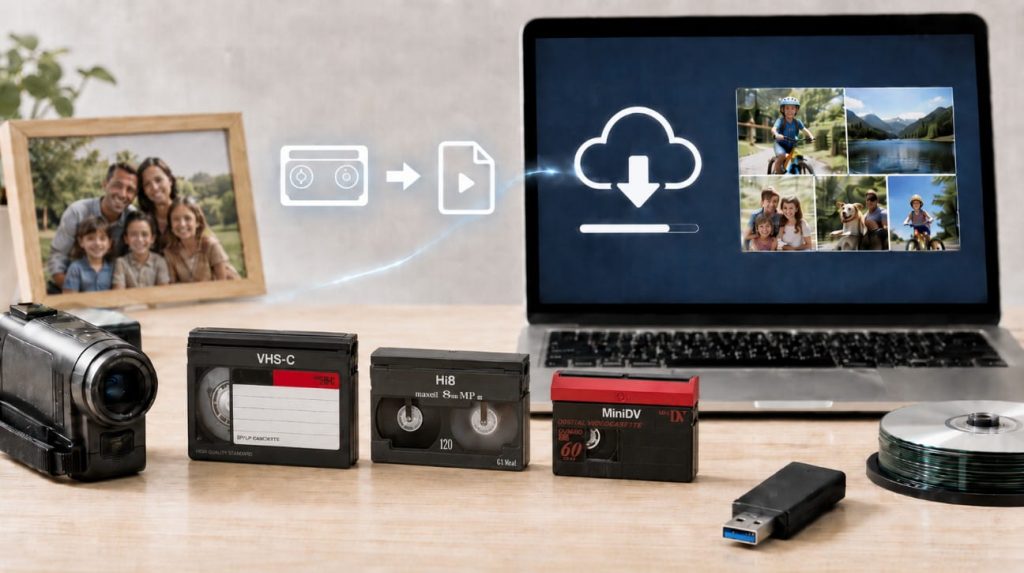
Old camcorder tapes can hold some of your most important family memories, including birthdays, vacations, school events, weddings, holidays, and everyday moments that may not exist anywhere else. The problem is that most people no longer have a working camcorder to watch them. Even if you still have the camcorder, the tapes and equipment are now aging. Playing old tapes in old equipment can sometimes create problems, especially if the tapes have been stored for years in a garage, attic, basement, closet, or storage unit. Converting old camcorder tapes to digital files is one of the best ways to preserve those memories before the tapes become harder to play.
What Are Old Camcorder Tapes?
Customers often call them “camera tapes,” but the more accurate term is camcorder tapes. These are the small tapes that were used in handheld video cameras before phones and digital cameras became common. Common camcorder tape formats include:- VHS-C
- 8mm
- Hi8
- Digital8
- MiniDV
Why Convert Camcorder Tapes to Digital?
Camcorder tapes were made for a different era. They were designed to be played through a camcorder or compatible tape deck, not through modern phones, tablets, smart TVs, or computers. Converting them to digital gives you a much easier way to watch, save, share, and back up the videos. Digital files can be stored on:- A USB drive
- A computer
- An external hard drive
- Cloud storage
- A phone or tablet
Camcorder Tapes Are Starting to Age
Many camcorder tapes from the 1980s, 1990s, and early 2000s are now decades old. Even if they were stored carefully, they were not made to last forever. Over time, camcorder tapes can develop problems such as:- Jumpy video
- Tracking problems
- Weak or missing audio
- Mold
- Heat damage
- Humidity damage
- Tape sticking or dragging
- Tape breaking or tangling
- Playback equipment problems
What Equipment Do You Need to Convert Camcorder Tapes Yourself?
To convert old camcorder tapes yourself, you usually need the original camcorder or a compatible playback device. You also need the correct cables, a video capture device, a computer, capture software, and enough storage space for the digital files. Depending on the tape format, you may need different equipment. A VHS-C tape may require a VHS-C adapter or compatible camcorder. Hi8 and Digital8 tapes may require the correct Sony camcorder or playback device. MiniDV tapes often require a working MiniDV camcorder and the correct capture setup. If you do not already own the equipment, the cost and frustration can add up quickly.DIY Camcorder Tape Conversion Can Be Time-Consuming
Camcorder tape transfer usually happens in real time. That means a one-hour tape usually takes about one hour to capture, plus setup time, testing, file checking, and saving. If you only have one or two tapes and already own working equipment, a DIY transfer may be possible. But if you have many tapes, different formats, damaged tapes, or no working camcorder, the process can become frustrating. Common DIY problems include:- The camcorder no longer works.
- The computer does not recognize the capture device.
- The wrong cable is used.
- The tape will not play, rewind, or fast-forward.
- The video looks jumpy or distorted.
- The audio is missing or out of sync.
- The final file is saved in the wrong format.
Playing Old Camcorder Tapes Can Be Risky
Old tapes can become brittle, moldy, sticky, tangled, or unstable. Playing them in old equipment can sometimes make existing damage worse. If the tape is fragile, the camcorder may eat the tape, wrinkle it, stretch it, or break it. If the tape has mold, playback can also contaminate the equipment. This is why it is important to be careful, especially with tapes that contain irreplaceable memories.What Format Should Camcorder Tapes Be Converted To?
For most customers, MP4 is the most convenient digital file format. MP4 files are easy to watch, save, share, upload, and back up. MP4 files usually work on:- Computers
- Phones
- Tablets
- Smart TVs
- USB drives
- Cloud storage services